
DesktopMirror for Outlook and ACT!5.0.0.1511 - Download
You'll be able to download in few seconds.
Publisher Description
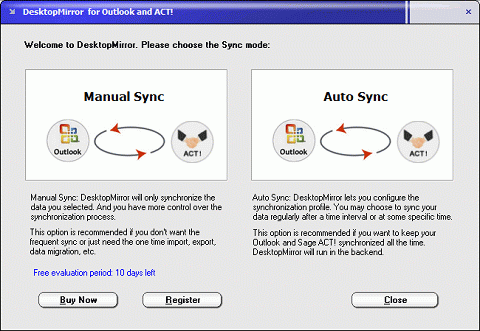
DesktopMirror for Outlook and ACT! lets you synchronize information between Microsoft Outlook and ACT!.
DesktopMirror works with Microsoft Outlook and ACT! on the following data:
- Outlook Contacts and ACT! Contacts
- Outlook Calendar and ACT! Calendar
- Outlook Tasks and ACT! To-do, Opportunities
- Outlook Notes and ACT! Notes
By synchronizing ACT! and Outlook, you may also simply copy your ACT! information to your mobile devices through the Mobile Outlook sync.
Why DesktopMirror?
- It is a simple and straight solution to sync ACT! and Outlook.
- You may sync data either in one-way or two-way.
- DesktopMirror provides on demand synchronization method that you can get more control with the synchronization.
- DesktopMirror doesn't delete information. Your information is safe during the synchronization.
- DesktopMirror has smart duplicate checking mechanism that avoid generating duplicate records.
- DesktopMirror can sync most complete Outlook and ACT! fields
- DesktopMirror supports the custom fields mapping mechanism to let you sync more customizable information.
- And more ...
DesktopMirror is very easy to use that you may sync all data with just one click!
It also provides many advanced options which you may need to customize your synchronization.
About DesktopMirror for Outlook and ACT!
This PIMS & Calendars program is available in English. It was last updated on 02 November, 2026. DesktopMirror for Outlook and ACT! is compatible with the following operating systems: Windows.
The company that develops DesktopMirror for Outlook and ACT! is LivePIM Software, Inc.. The latest version released by its developer is 5.0.0.1511.
The download we have available for DesktopMirror for Outlook and ACT! has a file size of 1.0 MB. Just click the green Download button above to start the downloading process. The program is listed on our website since 2013-03-27 and was downloaded 0 times. We have already checked if the download link is safe, however for your own protection we recommend that you scan the downloaded software with your antivirus. Your antivirus may detect the DesktopMirror for Outlook and ACT! as malware if the download link is broken.
How to install DesktopMirror for Outlook and ACT! on your Windows device:
- Click on the Download button on our website. This will start the download from the website of the developer.
- Once the DesktopMirror for Outlook and ACT! is downloaded click on it to start the setup process (assuming you are on a desktop computer).
- When the installation is finished you should be able to see and run the program.
Program Details
System requirements
Download information
Pricing
Version History
version 5.0.0.1511
posted on 2013-03-27
version 3.6.1
posted on 2011-05-18
Several fixes and updates
Disclaimer
External Download
We do not host DesktopMirror for Outlook and ACT! on our servers. We did not scan it for viruses, adware, spyware or other type of malware. This app is hosted by the software publisher and passed their terms and conditions to be listed there. We recommend caution when installing it.
The external download link for DesktopMirror for Outlook and ACT! is provided to you by apps112.com without any warranties, representations or guarantees of any kind, so access it at your own risk.
If you have questions regarding this particular app contact the publisher directly. For questions about the functionalities of apps112.com contact us.
